Video FPS Checker
Video file metadata can claim any frame rate it likes — this measures what’s actually inside the file: how many decoded frames are genuinely distinct, versus how many are the same frame repeated to pad out a higher container rate. Free, runs entirely in your browser — files never leave your machine.
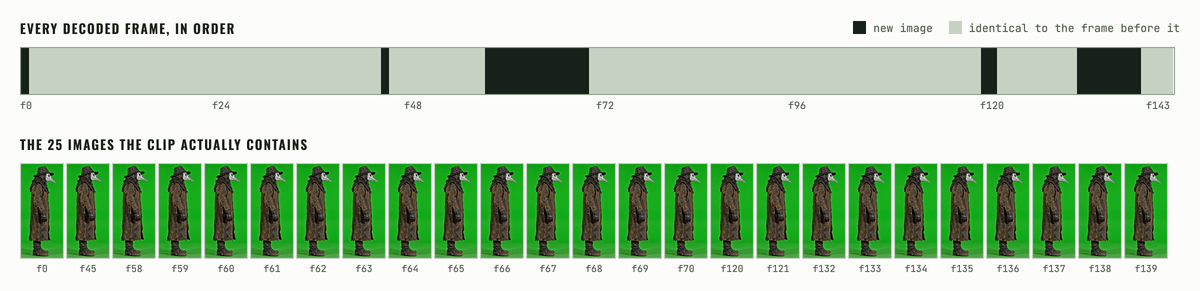
kie_a2_idle, measured with the same duplicate detector this page runs: 144 decoded frames, only 25 of them a new image. A 24 fps container carrying about 4.2 fps of real animation — and two stretches where the character holds still for roughly two seconds.Drop a video here or
MP4 / WebM / MOV
How it works
- Your browser decodes and captures each presented frame with its real timestamp, via
requestVideoFrameCallback— not the container’s declared frame rate. - The measured presentation fps is the median gap between consecutive frame timestamps — robust to the odd dropped or doubled frame.
- Each frame is compared to the one before it on a downscaled, box-averaged copy; near-identical frames are flagged as duplicates of the one before.
- Effective fps = measured fps × the fraction of frames that are unique — the frame rate of the clip’s actual motion, independent of container padding.
- The timeline strip visualizes every captured frame as one column: printed for unique, pale for duplicate.
Why AI and upscaled video lies about fps
Many AI video generators natively render at a modest frame rate — 8, 12 or 16 fps of real animation is common — then the export pipeline or an upscaler interpolates or simply repeats frames to hit a “smoother-looking” 24, 30 or 60 fps container. The file’s metadata reports the container rate, not the real one, so any tool that trusts it (or trusts a naive frame count) overstates how much motion actually exists. That matters directly for sprite work: packing every raw frame into a sheet wastes space on repeats, and a naive duplicate-frame count can look like intentional held poses when it’s really just padding.
Frequently asked questions
Why does this show a different fps than my video editor?
Most editors read the container’s declared frame rate from the file header. This tool measures the actual decoded presentation timing and pixel content instead, which is what determines how much real motion the clip carries.
What counts as a duplicate frame?
A frame is flagged as a duplicate of the one before it when fewer than about 12 pixels (on a downscaled, box-averaged comparison) changed by more than a small threshold. This catches exact and near-exact repeats, not merely similar frames.
My clip is genuinely a slow, calm scene — will this false-flag it as padded?
It can, since a subject that is nearly motionless for a stretch produces the same low-pixel-change signal as duplicated frames. Treat the verdict as a measurement to sanity-check by eye against the timeline, not an automatic diagnosis.
Is my video uploaded anywhere?
No. Decoding and analysis both run in your browser. Your file never leaves your machine.
What do I do once I know my real fps?
Use it to set an honest frame budget for a sprite sheet — packing every raw frame from a padded-cadence clip wastes space on repeats. The video to sprite sheet converter has a setting to keep unique frames only.