Sprite Sheet Maker
Drop in a folder or a selection of individual frame images and get back one packed sprite sheet PNG. Free, runs entirely in your browser — files never leave your machine.
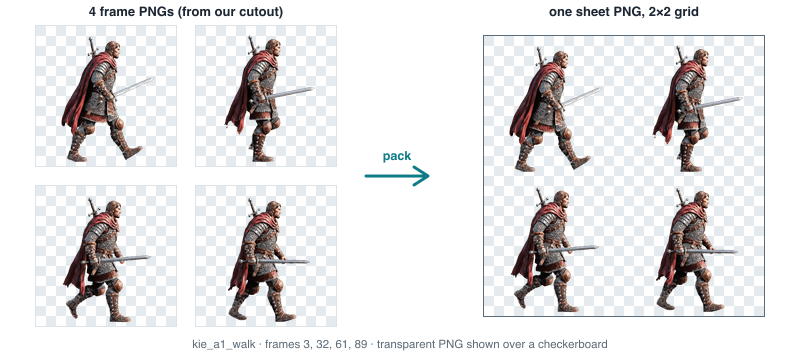
kie_a1_walk — packed into one 2×2 sheet, no scaling, no re-encoding. The checkerboard is the page showing you that the PNGs really are transparent.Drop images or a folder here or
PNG / WebP / JPG · any number of frames
How it works
- Upload individual frame images, or drag a whole folder in — subfolders are read recursively.
- Frames are sorted by filename (natural sort, so
frame2comes beforeframe10) by default; drag the list to reorder manually. - The cell size is set to the largest width and largest height across every uploaded image — every frame is centered inside that cell with transparent padding, never scaled up or down.
- Set your column count and the frames pack left to right, top to bottom.
- Download the sheet as one PNG, with the frame size, grid, and count printed alongside it.
Why frames are padded, not scaled
Scaling mismatched frame sizes to fit a uniform cell distorts proportions and softens pixel-art edges — a frame that’s 2px taller than the rest would get stretched or squashed to match, which is visible in-engine as a size hiccup between animation frames. Letterbox padding instead keeps every frame at its original pixel size and centers it inside a cell big enough for the largest frame in the set, so nothing gets resampled.
Frequently asked questions
Why is there so much empty space around my smaller frames?
The cell size is fixed to the largest frame in your set, and smaller frames are centered inside that cell with transparent padding rather than scaled up. If your frames vary a lot in size, consider trimming or re-exporting them at a consistent size before packing.
Can I drag a whole folder of frames in at once?
Yes — drop a folder onto the upload area and every image inside (including subfolders) is read automatically. The file picker button accepts multiple individual files instead if you prefer.
How do I control frame order?
Frames sort by filename (natural/numeric order) as soon as they load. Drag any row in the list to reorder it manually — the preview and download update immediately.
Is my image data uploaded anywhere?
No. Loading, padding and packing all happen in your browser using the Canvas API. Nothing is sent to a server.
What file formats are supported?
PNG, WebP and JPG. Use PNG for frames that need transparency — JPG has no alpha channel, so those frames will be packed as fully opaque.