Sprite Sheet Splitter
Upload a sprite sheet image, tell it how many rows and columns the grid has, and download every cell as its own PNG. Free, runs entirely in your browser — files never leave your machine.
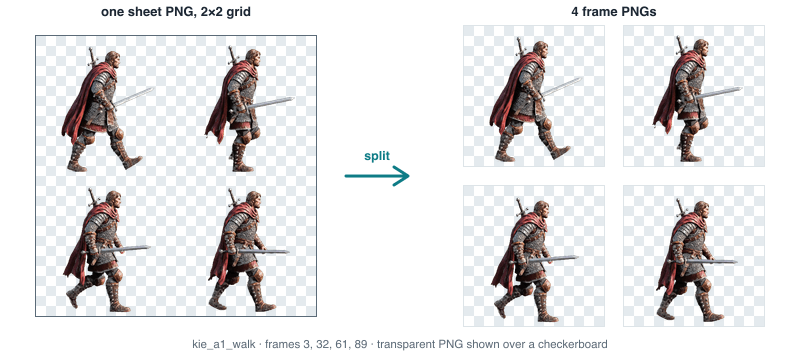
kie_a1_walk, cut back into four transparent frame PNGs of exactly 140×140 px each. The checkerboard shows the transparency the cells keep.Drop an image here or
PNG / WebP / JPG
How it works
- Upload a sprite sheet — a single image containing a grid of frames.
- Set the number of rows and columns the grid actually has (auto-guess tries a range of even divisions of the image’s pixel dimensions and picks the one whose grid lines fall most on transparent gaps between cells — a starting point, not a guarantee).
- The overlay draws red grid lines over the image so you can confirm the split lines land where you expect before downloading.
- Each cell is cropped out at its native pixel size — no scaling — and packed into a ZIP.
Why manual rows/columns is the default
Sprite sheets don’t carry their grid dimensions as metadata, and a lot of real-world sheets have padding, trimmed cells, or a non-square layout that a purely automatic guess gets wrong silently. Auto-guess is offered as a starting point — it only tests grids that evenly divide the image’s width and height, and scores them by how much transparency sits along the cut lines — but you should always check the red overlay against the actual sprite boundaries before downloading, especially on sheets without transparent padding between cells (its scoring signal is weak on solid-background sheets).
Frequently asked questions
Does auto-guess always find the right grid?
No — it only tries row/column counts that evenly divide the image’s pixel dimensions, and scores them by transparency along the cut lines. It works well on sheets with padding between cells and can miss on sheets with none. Always check the overlay before downloading.
What if my sheet’s cells aren’t evenly sized?
This tool assumes a uniform grid (every cell the same width and height). Sheets with irregular or trimmed cell sizes will need a different tool or manual cropping.
Is my image uploaded anywhere?
No. The image is decoded and sliced entirely in your browser using the Canvas API. Nothing is sent to a server.
What file formats work?
PNG, WebP and JPG. PNG is recommended if your sheet has transparency, since JPG has no alpha channel.
Can I turn the cut cells back into a new sheet?
Yes — download the ZIP, then upload the individual frames into the sprite sheet maker to repack them into a different grid.